
An empty apartment is one of the hardest things to sell. Not because the space is wrong — because most buyers can't picture how their life fits into four bare walls and a window. A stylist and a furniture rental truck used to be the only fix, and that's expensive and slow enough that a lot of listings just skip it and hope the buyer has imagination to spare.
Virtual staging AI exists to close that gap without the truck. This article covers how it actually works under the hood (it's not "generate a new room" — it's an edit on your real photo), a real before/after produced this way, and the disclosure practice that keeps virtual staging useful instead of misleading.
The one thing to get right: staging is an edit, not a new room
The operation that matters here is edit, not regenerate. You're not asking a model to invent a living room from scratch — you're asking it to preserve a real photograph of a real room and add furnishings on top of it. Get this distinction backwards and you'll lose the thing that makes a listing photo trustworthy: the buyer needs to be looking at their room, not a generic stock interior that happens to be styled nicely.
The practical version of this is a preservation clause in your prompt: state what must stay exactly as it is (camera angle, window position, wall color, floor material, room proportions) before you state what should be added or changed. Skip the preservation clause and just ask for "a furnished version of this room," and you'll often get a plausible-looking result — but the model decides the camera angle and proportions too, and what comes back may not be recognizable as the actual listed unit.
A real before/after, produced this way
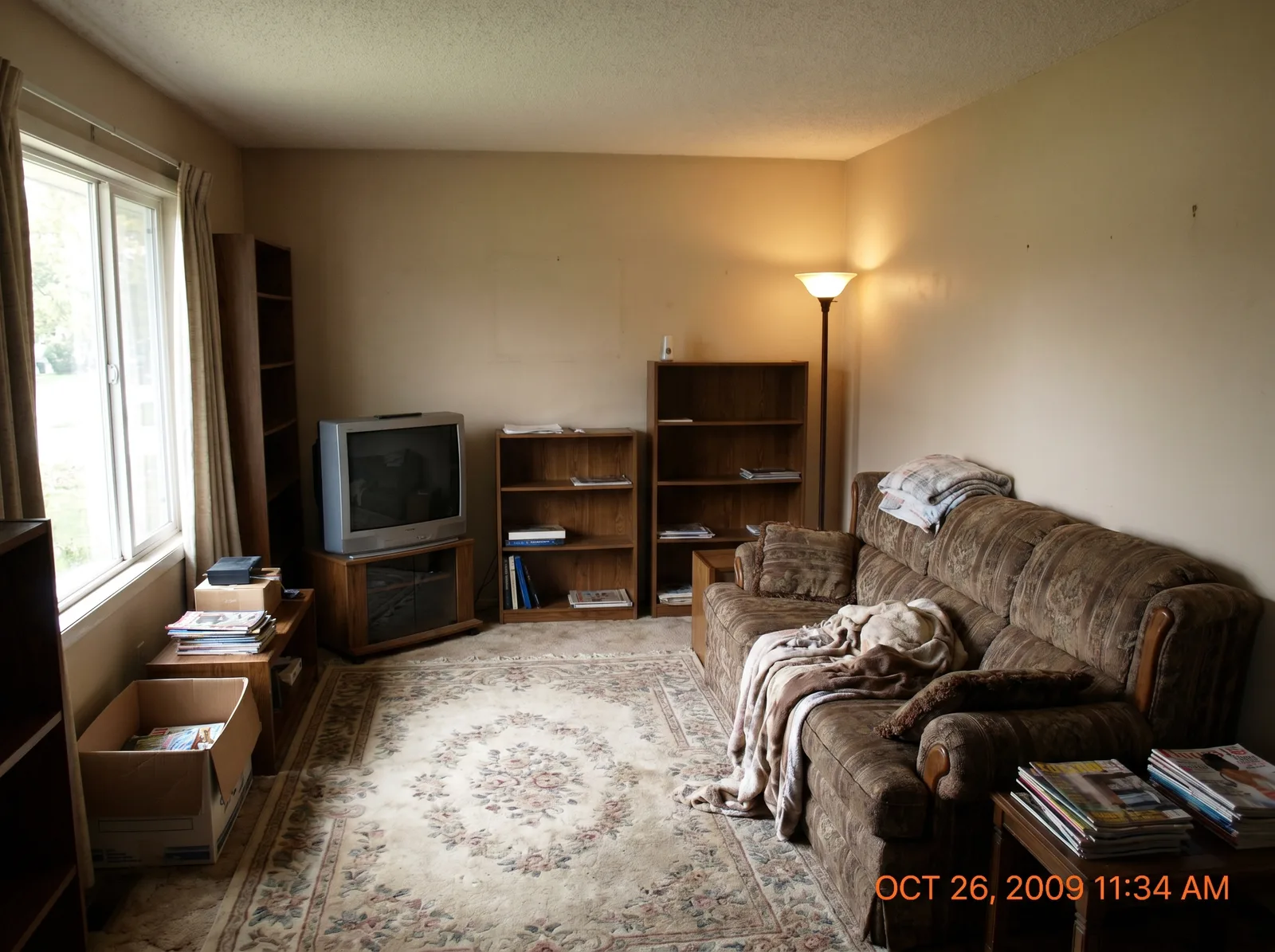
The pair below comes from Syntina's own production flow — an edit request built on the pattern above, run on a plain, dated living room scene.
Before:
After — "keep composition, camera angle and furniture placement exactly the same, ONLY restyle the room in a Scandinavian direction: light oak elements, warm textiles, add plants":
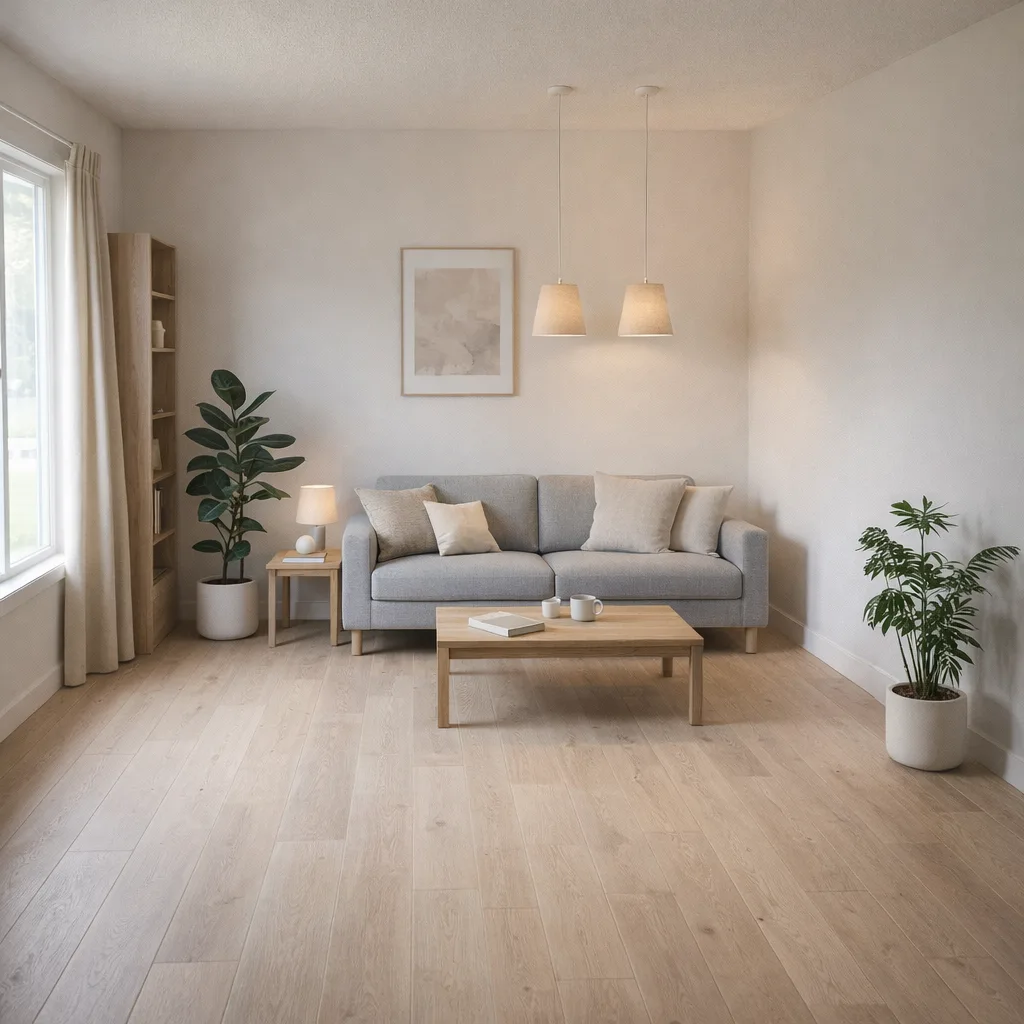
Being fully honest about this pair, the way we'd want any staging vendor to be honest with you: the window and sofa stayed on the same general side, but the framing didn't lock perfectly — the "after" image drifted slightly toward a tighter, more square crop, and the room reads a little smaller as a result. That's the real, observable behavior of an edit-based workflow: preservation is a result of how precisely you instruct the model, not a guaranteed rule. For a listing photo where framing accuracy matters, you'd catch this kind of drift before publishing and re-run with an even more explicit instruction — "keep the exact same crop and framing" — rather than accept the first result. Treat every staged image as a draft to review, not a final asset to publish blind.
The workflow, step by step
- Photograph the empty room properly. Shoot the widest reasonable angle that captures the whole room (or the full wall you want staged); a cropped or narrow shot forces the model to guess at what's outside the frame. Shoot in flat, even daylight — harsh shadows or strong backlight make it easy for the model to confuse a shadow edge for a material edge. Shoot from a natural eye-level height; extreme angles (very high or very low) distort the model's read of room scale.
- Write a preservation-first prompt. State the room type, then explicitly lock the camera angle, window/door position and room proportions, then describe the furnishing and style you want added. Our prompt-writing guide covers the full 7-point pattern this is based on.
- Generate, then review before you trust it. Check the edges: where furniture meets floor, where a rug meets a wall, whether the crop matches the source. This is exactly the kind of small drift shown in the example above — catch it here, not after publishing.
- Produce style alternatives from the same source photo, not from a new photo each time. If you want to show a buyer both a "modern minimalist" and a "warm Scandinavian" version, run both as edits on the same original — that's what keeps them genuinely comparable, and it's faster than restarting from scratch each time.
- Disclose that it's staged. See the section below — this isn't optional in most markets, and it isn't optional for trust either.
Disclosure: the part that keeps virtual staging honest
Virtual staging is a legitimate, widely used real estate marketing practice — but only when the buyer knows what they're looking at. The practice that keeps it trustworthy, and that many listing platforms and real estate boards require outright:
- Label staged photos as staged, typically directly on the image or in the listing caption ("virtually staged" is the standard phrasing).
- Never present a virtually staged photo as the unit's actual furnished condition. The furniture shown is illustrative of scale and possibility — it is not included in the sale unless you separately say so.
- Disclose the same way for renovation-preview edits — if you're using the same edit technique to show a dated kitchen or bathroom in a renovated state (a related use case covered in our AI interior design from a photo guide), that image needs the same "for illustration" framing, since it isn't the property's current condition either.
Rules vary by platform and region, so check your local MLS or listing-platform policy for the exact required wording — but the underlying principle is constant: virtual staging sells the space, not a false claim about what's inside it.
Where this helps most
- Empty investor units and new construction — nothing to photograph but bare walls, and staging is often the only way to make the space legible to a buyer.
- Vacant listings mid-move — the seller's furniture is gone, the new buyer's isn't there yet.
- Comparing style directions for the same unit — showing "modern" versus "warm minimal" versions of one listing helps a broader range of buyers picture themselves in it, without a second furniture rental.
- Dated-but-structurally-sound units — paired with a disclosed renovation-preview edit, this can help a buyer see past outdated finishes to the layout underneath.
FAQ
Is virtual staging AI legal for real estate listings?
Yes, in most markets — it's a widely accepted marketing practice. The consistent requirement is disclosure: the image must be labeled as virtually staged, and never presented as the unit's actual condition. Check your local MLS or platform's specific disclosure rules.
Does virtual staging replace real furniture photography?
For marketing and early buyer interest, it's a strong stand-in for an empty room. It doesn't replace an in-person walkthrough, and it shouldn't be the only image in a listing if the unit is genuinely bare — buyers should also see the real, unstaged room.
Why did the room proportions shift slightly in the example above?
Because an edit's preservation is only as precise as the instruction driving it — the model held most of the scene fixed but let the crop drift. A more explicit "keep the exact same framing" instruction, or a second pass, usually corrects it. Review every staged image before publishing rather than accepting the first result.
Can I try different furniture styles on the same room without new photos?
Yes — that's the point of the edit-based approach. Run each style as a separate edit on the same source photo rather than starting from a new photo each time, so the results stay genuinely comparable.
Ready to stage your own listing photos? Try AI interior visualization, read the related AI interior design from a photo guide, or start free.