
In interior design, you usually know the exact moment you lose a client: you're describing one thing, they're picturing another, and neither of you realizes it — until the render finally arrives. When "what if the walls were charcoal?" comes up, a classic workflow makes you wince internally, because that simple question means hours of new rendering.
This isn't a tool roundup. It's a workflow: why each step from brief to presentation happens in that order, and what you lose if you skip one. And we're not backing the claims with words alone — every image below comes from the same product, produced for real.
One rule: the model decides anything you leave blank
AI image generation isn't a designer — it's a decision executor. Hand the model a client brief like "modern but warm living room" and you haven't chosen the flooring, the light, the furniture form, or the camera — the model has. The result might look good, but it won't be your project's living room, and the next generation will likely give you a different one again.
The practical consequence: at every step of this workflow, the goal isn't "generate more" — it's leave the model less room to decide. The four steps below — brief, prompt, first generation, revision — show exactly how to do that.
Step 1: turn the brief into decisions
A typical note from a client meeting reads like: "Modern but warm, airy, not too cold." That's not a brief — it's an intention. Paste it into a prompt as-is and you leave the model seven blanks to fill: project type, room, style, material, light, camera, quality.
We've already covered how to turn a brief into a prompt in a separate guide — see the 7-point prompt template for the general method. Here, we apply it to a living room brief.
We turned the client's note into this decision set: residential living room, oak parquet floor, off-white walls, a black steel-and-glass bookshelf, beige fabric sofa, linen curtains, midday light. All seven points are filled — not a contradictory phrase like "modern but warm," but concrete material and light decisions.
Step 2: first generation — the brief, made visible
Once that prompt is sent to a generation tool, here's what comes out:
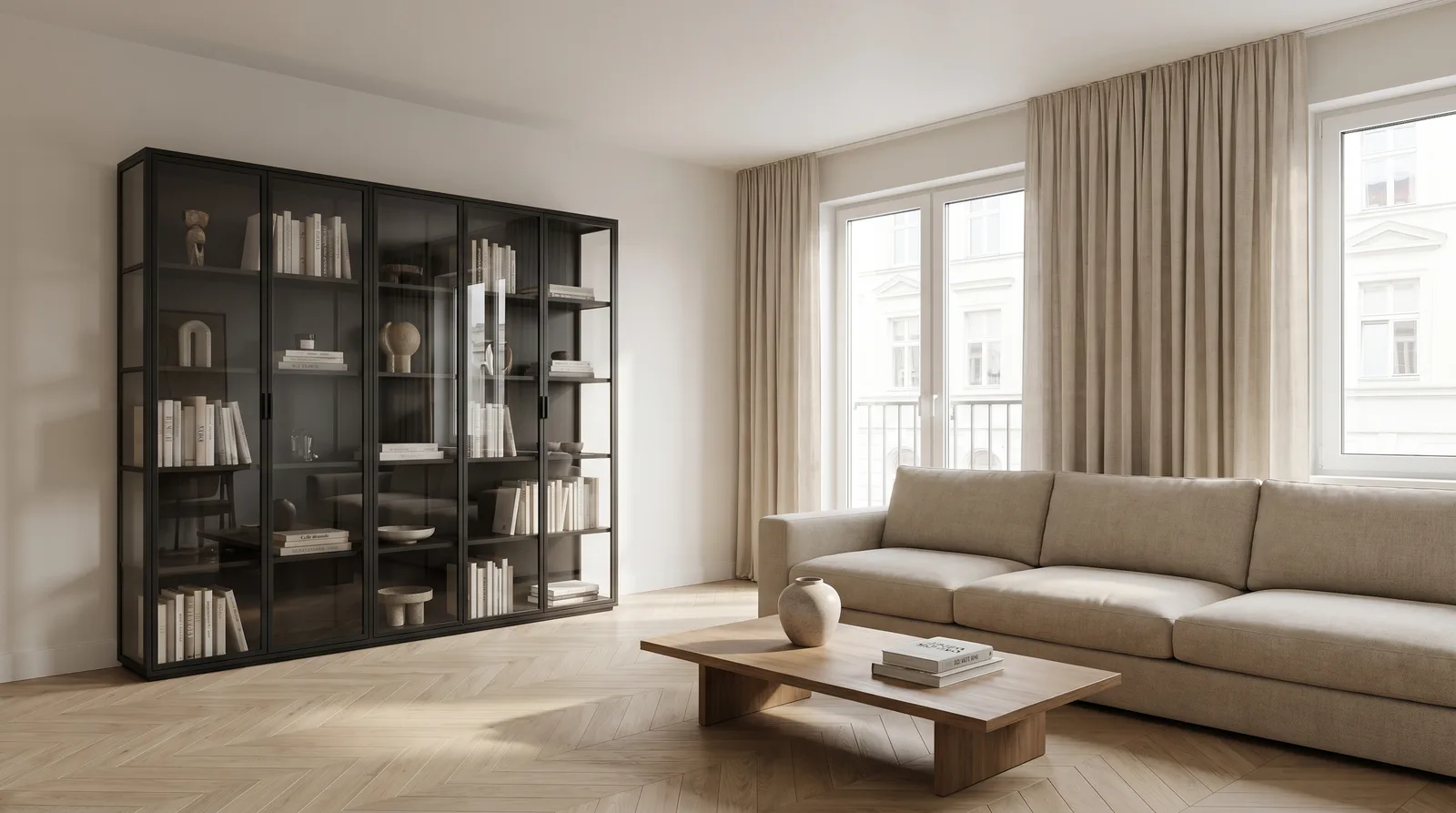
What matters here isn't how "nice" the image looks — it's that every decision in the brief has a visible counterpart: the parquet tone, the wall color, the bookshelf material, the sofa fabric, the softness of the light through the window — all of it was a written decision. The model didn't improvise here, it executed the instruction. That's the real measure of a good first generation: not a surprise, but your description coming out correctly.
Step 3: revision — where the real work happens
The real work starts here. A client looks at the first image and almost never says "leave it exactly like that" — they want one thing changed. In a classic workflow, that means reopening the model file, swapping the material, and re-rendering; hours pass.
In AI, this is an edit, not a regeneration. The key difference: you frame the request by first stating what stays the same, then exactly what changes — not just "make the sofa darker":
Keep everything in the image the same — composition, camera angle, light, and every other piece of furniture and surface unchanged. ONLY change the three-seat beige fabric sofa to dark anthracite velvet; keep its form and position the same.
Here's the result, on the same source image:
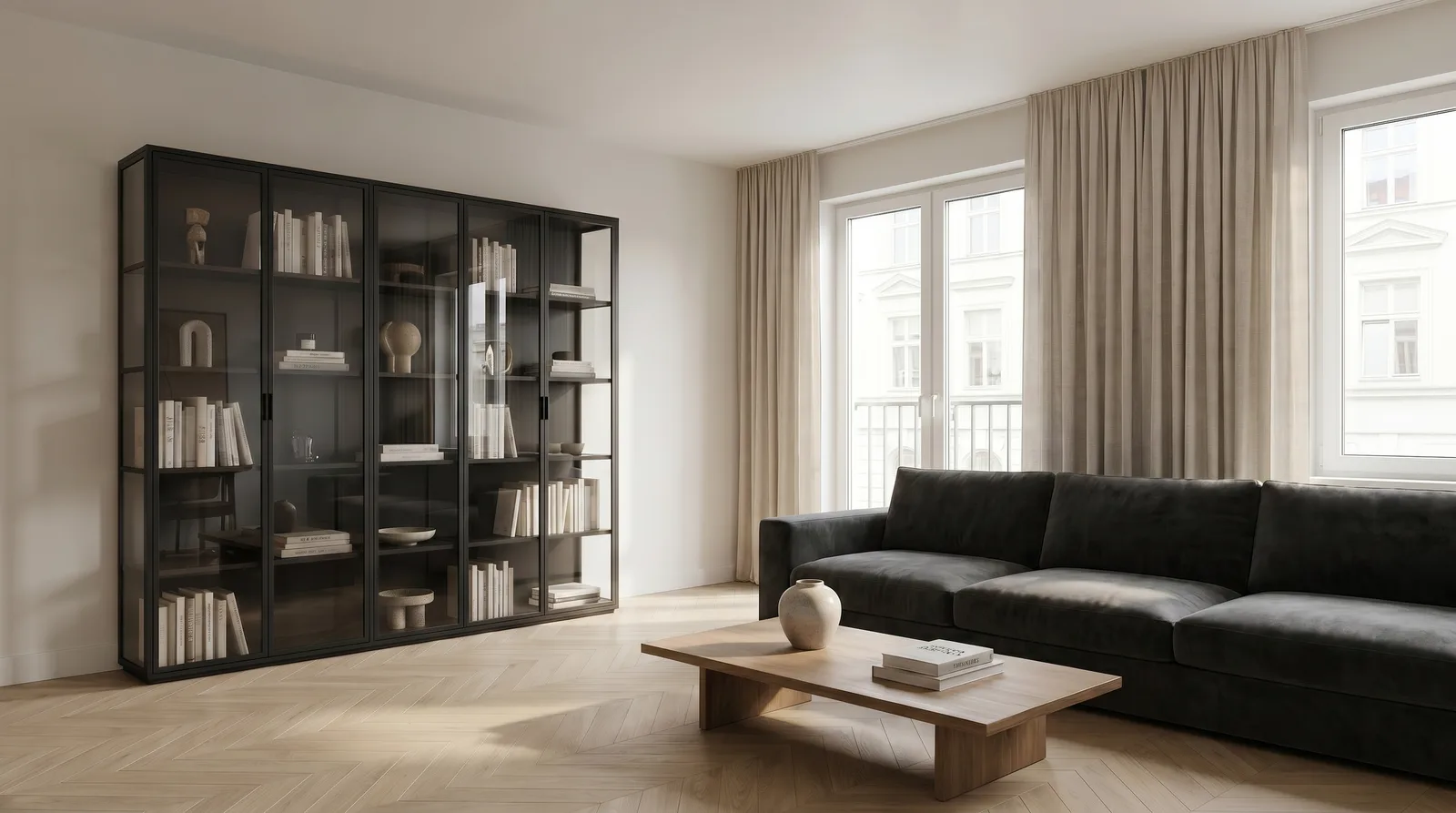
Put the two images side by side and the bookshelf, curtains, floor pattern, where the light falls, and the camera angle are identical — the only thing that changed is the sofa's color and fabric. That's what the preservation clause guarantees: you answer one question without giving the client "did the rest change too?" anxiety. Skip the preservation clause and just say "make the sofa darker," and you'll usually still get a sensible result — but the model decides which tone and fabric arrive. In a client presentation, that decision needs to stay yours.
Step 4: chain revisions, don't restart
In a real client meeting, one revision is rarely enough. A second question follows: "What if the light were evening?" A third: "Could we add a couple of people in there?" Each of these is its own edit step, and each works on top of the previous output — you don't start from zero:
- Generate → the brief's counterpart (Step 2).
- Revision 1 → "ONLY change the sofa to dark anthracite velvet" (Step 3).
- Revision 2 → "Keep the same scene and furniture fixed; shift the light to golden hour, warm orange light through the window."
- Revision 3 → "Preserve the image; add 1-2 people in a natural pose, scaled to match the room."
Ask for one change per step. Cram "darken the sofa, make it evening, and add people" into a single prompt, and the model prioritizes — usually leaving all three half-done, and the preservation clause falls apart too, because the number of things you said "stay the same" ends up smaller than the number of things you're trying to change.
Where this applies
Residential projects: living rooms, bedrooms, kids' rooms — quickly try styles that reflect a client's lifestyle. In costly rooms like kitchens and bathrooms, presenting a clear vision before construction is especially critical, because a revision there is expensive.
Commercial spaces: restaurants, cafés, offices, hotel lobbies. Compare concepts fast while staying true to a brand's color and material language.
Real estate (virtual staging): an empty apartment is a hard sell. Virtual staging takes a photo of an empty room as input and makes it feel lived-in for a prospective buyer — here too, the operation is an edit on an existing photo, not a fresh generation.
Common mistakes
- Copying the brief straight into the prompt. The "modern but warm" contradiction stays in the model; turn the brief into a concrete decision before you generate.
- Confusing revision with regeneration. Writing "living room with a dark sofa" produces a new living room — your composition is gone. Use the preservation-clause-plus-single-change pattern instead.
- Asking for more than one revision in a single prompt. Go one at a time, like the chain above; combine them and the model picks its own priority.
- Writing materials vaguely. "Wood floor" instead of "light oak parquet," "stone" instead of "large-format grey porcelain tile" — the more concrete the name, the more controlled the result.
FAQ
Can I generate live during a client meeting?
Yes — generation and editing each take a few minutes, so answering "what if we tried..." with an actual image, live in the meeting, is realistic in practice. For credit-metered operations like video, the system shows the cost before generating and asks for confirmation.
Is revision unlimited?
There's no hard technical limit, but there's a practical one: each revision adds a small change on top of the last one. Stack too many, and the preservation clause has to track an ever-growing list of "stay the same" items — at that point, starting a clean regeneration is often faster.
Does virtual staging replace real furniture photography for a listing?
For marketing and early buyer interest, it's a strong stand-in for an empty room — but disclose that furnishings are illustrative, not what's actually included in the sale.
Want to speed up your own interior projects? Try AI interior visualization, read the full AI architectural rendering guide, or start free.