
A studio we talked to had a villa project due for client presentation in three days. Their usual render partner couldn't slot the job in for another ten. "What do we do now?" isn't a rare question — most architects have hit some version of it.
So let's answer the headline honestly: does AI exterior rendering actually work, or is it a speed trade-off that costs you quality? The answer is neither — it depends entirely on where you use it. This article draws that line clearly.
Where the classic process bottlenecks
Exterior rendering is one of the most commonly outsourced tasks in architecture studios. The reason is simple: it needs time and specialized skill. Light simulation, landscaping, atmosphere — doing these right takes hours. But clients don't want to wait. Sales offices set brochure print deadlines; competitions set submission deadlines.
Where it's strong: massing, material, light — the same facade in different versions
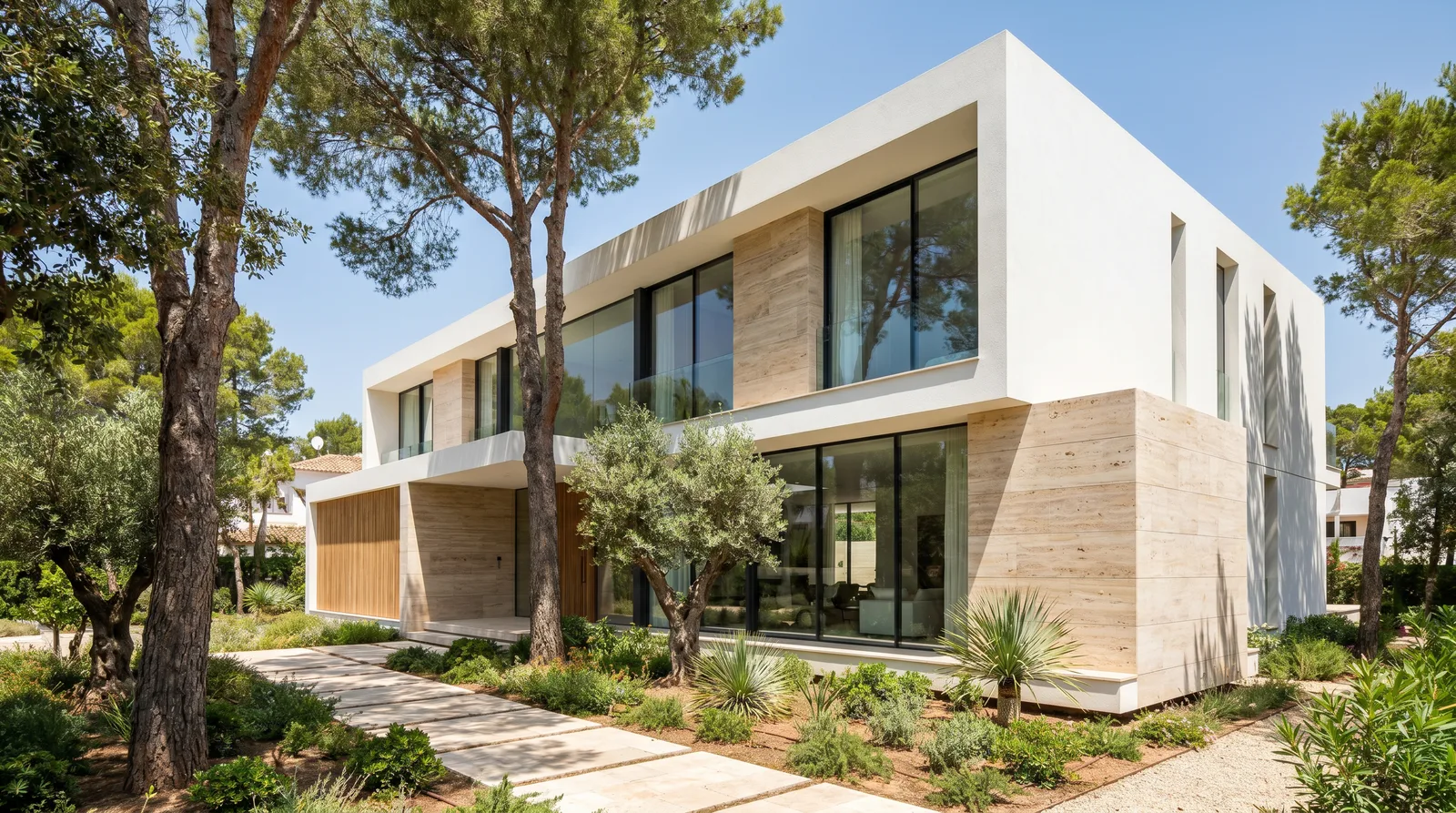
AI's clearest win is showing the same building under different conditions. Once a facade is set up correctly once, changing the time of day, season, or atmosphere isn't a new render — it's an edit: massing and camera stay fixed, only the light and its dependent details change. As proof, here are two versions of the same villa facade.
Daytime — first generation:
Evening — an edit request on the same facade:
Turn this same villa facade into a golden-hour sunset version. Keep composition, camera angle and building geometry the same; don't change the material or landscaping. Make the sky warm orange-purple sunset tones, with long soft shadows. Turn on interior lighting and exterior facade spotlights, with warm white light spilling from the windows and landscape lighting.
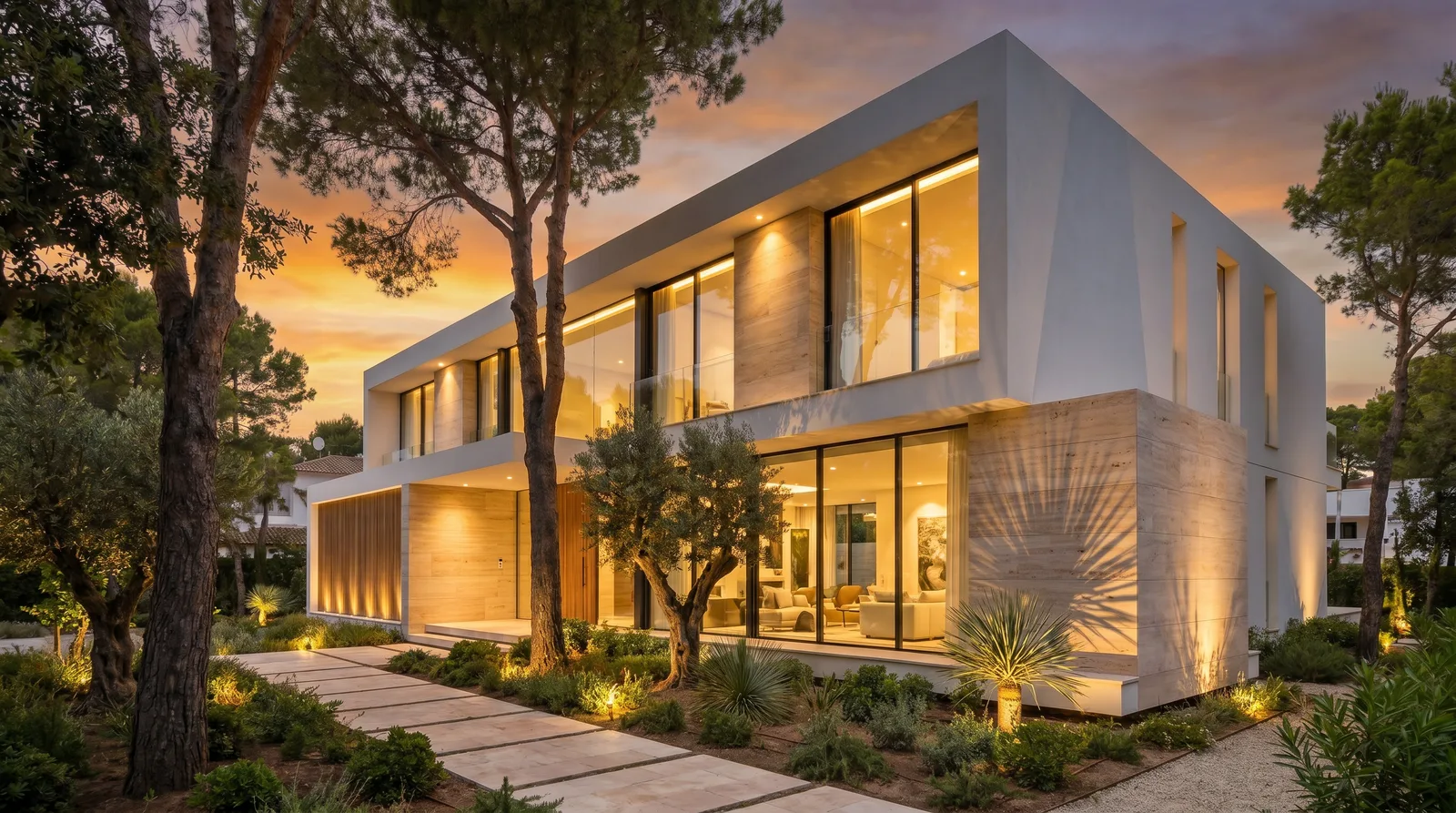
Lay the two images over each other and the building mass, the travertine cladding pattern, the window frames, the position of the trees and the stone path are identical — what changed is the sky, the shadow length, and whether the lighting is on. That's exactly what a sales office or brochure job needs: several presentation-ready versions from one correct facade, without rebuilding from scratch each time.
The same logic applies to material: keep the composition fixed and say "ONLY change the facade cladding from white stucco to anthracite metal panel," and the model preserves everything else. The pattern for a facade prompt is: material + light condition + camera angle — for example, "white stucco and natural stone cladding, wide glass surfaces; golden hour light, slightly low-angle wide shot, photorealistic architectural photography."
Where it's limited: not a substitute for exact dimensions and detail drafting
This is the part where honesty matters. AI rendering is a presentation image, not a building-permit drawing:
- Very specific architectural elements — a railing profile, a facade cladding joint detail — sometimes stay open to interpretation; the model's "reasonable-looking detail" may not exactly match what you drew.
- If you need a specific material brand or product (a particular stone quarry, a particular window-frame profile), describing it in words isn't enough — you need to supply a reference image.
- Dimension and proportion control is "approximately right" to an architect's eye, but it doesn't replace a construction-ready set.
These limits don't make AI worthless — they just define which stage you should use it at.
Building a facade prompt that actually works
The pattern shown above — material + light condition + camera angle — holds up across most exterior work, but a few practical habits make the difference between a first result that's close and one that needs three more tries:
- Name the material, don't describe a feeling. "Modern facade" leaves the model to decide everything; "white stucco with travertine stone cladding at the base" leaves it almost nothing to guess.
- Specify the light explicitly. "Golden hour, long soft shadows" and "overcast midday, diffuse light, no strong shadows" produce genuinely different moods — naming one avoids a random result.
- State the camera position. "Slightly low angle, wide shot" versus "eye level, straight-on" changes how imposing the massing reads; leaving this out means the model picks for you.
- When editing an existing render, always add a preservation clause first. "Keep composition, camera angle and building geometry the same" has to come before "change X" — otherwise the model may treat your request as a fresh generation and redraw the whole facade, not just the part you asked about.
Who this is for
- Architecture studios pitching villa and residential exteriors — need several credible facade directions fast, before committing to a full render
- Sales offices and developers — need brochure-ready exterior images on a fixed print or campaign deadline
- Competition teams — need multiple massing/material combinations visualized under a tight submission window
- Renovation and facade-upgrade proposals — showing a client "here's your building with a new cladding material" without touching the actual structure yet
The honest time comparison
Let's be direct. For a classic exterior render:
- Model preparation: 4-8 hours
- Render settings: 2-4 hours
- Processing time: 1-3 hours (depending on hardware)
- Revisions: 2-4 hours each
With AI:
- Input preparation: 15-30 minutes
- Generation: 2-5 minutes
- Variations (like the day-to-evening pair above): 2-5 minutes each
- Revision: 5-15 minutes
That gap isn't "a bit faster" — it's a fundamentally different workflow. Most of the difference comes from this: producing a variation in a classic pipeline means a new render, while in AI it's an edit step on top of the facade you already have.
So when do you still need classic rendering?
Some situations still call for a traditional render:
- Final project-book images (print quality, exact detail control)
- Work that requires animation
- Cases needing very specific lighting analysis
But everything from concept to approval — 3-5 angles, different atmospheres, sales-office and brochure images, client approval rounds, competition pre-selection — is where AI clearly wins.
The takeaway
That studio with the three-day deadline? They built their presentation with AI, the client liked it, the project moved forward. Classic rendering? That came later, at the final stage, for only the 3 selected angles. AI didn't replace classic rendering here — it supported it. Back to the headline question: it genuinely works, but not "equally everywhere" — strong at massing, material and light variation; the exact-dimension and final-print detail work is still classic rendering's job.
Related reading
- AI Architectural Rendering: The Complete Guide
- How Long Does Architectural Rendering Take? AI vs V-Ray
FAQ
Is AI facade rendering as accurate as V-Ray for a final delivery? Not for technically verified final deliverables — those still need CAD-level accuracy and a classic render engine. For concept, variation and client presentation, AI facade rendering is typically faster and cheaper.
Can I get a day and night version of the same facade without re-rendering? Yes — that's the edit workflow shown above: keep composition, camera and geometry fixed in the instruction, and only change the light/sky/material you actually want changed.
Does AI handle landscaping and site context well? It preserves whatever landscaping is in your source image or description reasonably well when you explicitly tell it not to change; it doesn't calculate planting plans or site engineering.
Want to see AI exterior rendering on your own project? Explore AI architectural visualization features or start free.