
Image generation and editing with GPT Image 2.6, inside Syntina.
GPT Image 2.6 has two modes in Syntina: Fast for quick iteration and Quality for detailed work. Both connect directly to OpenAI's own API; you can pick quality from low to max and get 2K and 4K output.
- Models in Syntina
- GPT Image 2.6 Fast and GPT Image 2.6 Quality
- Connection
- Directly to OpenAI's own API
- Where
- Canvas, the SketchUp and 3ds Max plugins (image editing) and the iOS app
- Credits
- Depend on quality and size and are shown before you generate; Fast and Quality bill the same
Latest from OpenAI
What OpenAI shipped on the image side
Compiled from OpenAI's own announcement, API guide and notice pages. OpenAI's claims are reported as OpenAI's claims.
4 November 2026
Images 2.6
OpenAI released Images 2.6 in ChatGPT, in Codex and in the API. The API has two models: Flare and Sunburst.
Source: OpenAI: Introducing Images 2.64 November 2026
Flare and Sunburst
In OpenAI's guide, Flare is for fast iteration and Sunburst for detailed visual work. Sunburst is also the one it points to when editing precision matters most.
Source: OpenAI API: Image generation guide4 November 2026
A longer quality ladder
Quality options are low, medium, high, xhigh, max and auto. According to OpenAI's guide, earlier GPT Image models stop at high.
Source: OpenAI API: Image generation guide4 November 2026
New output formats and markup-guided edits
Per the guide, output can be PNG, JPEG or WebP, plus SVG (generations only) and GIF (2 to 16 frames). Edits guided by a markup layer are documented there too.
Source: OpenAI API: Image generation guide1 December 2026
Older image models shut down
OpenAI announced that gpt-image-1.5, gpt-image-1-mini and chatgpt-image-latest shut down on 1 December 2026. It names 2.6 Sunburst and Flare as replacements. The notice is dated 2 June 2026.
Source: OpenAI API: Deprecations
Why GPT Image 2.6
What does an architect need from an image model?
Most of the time you are not making an image from scratch: you are changing part of one you already have. That is why edit precision and iteration speed matter.
Precision in editing
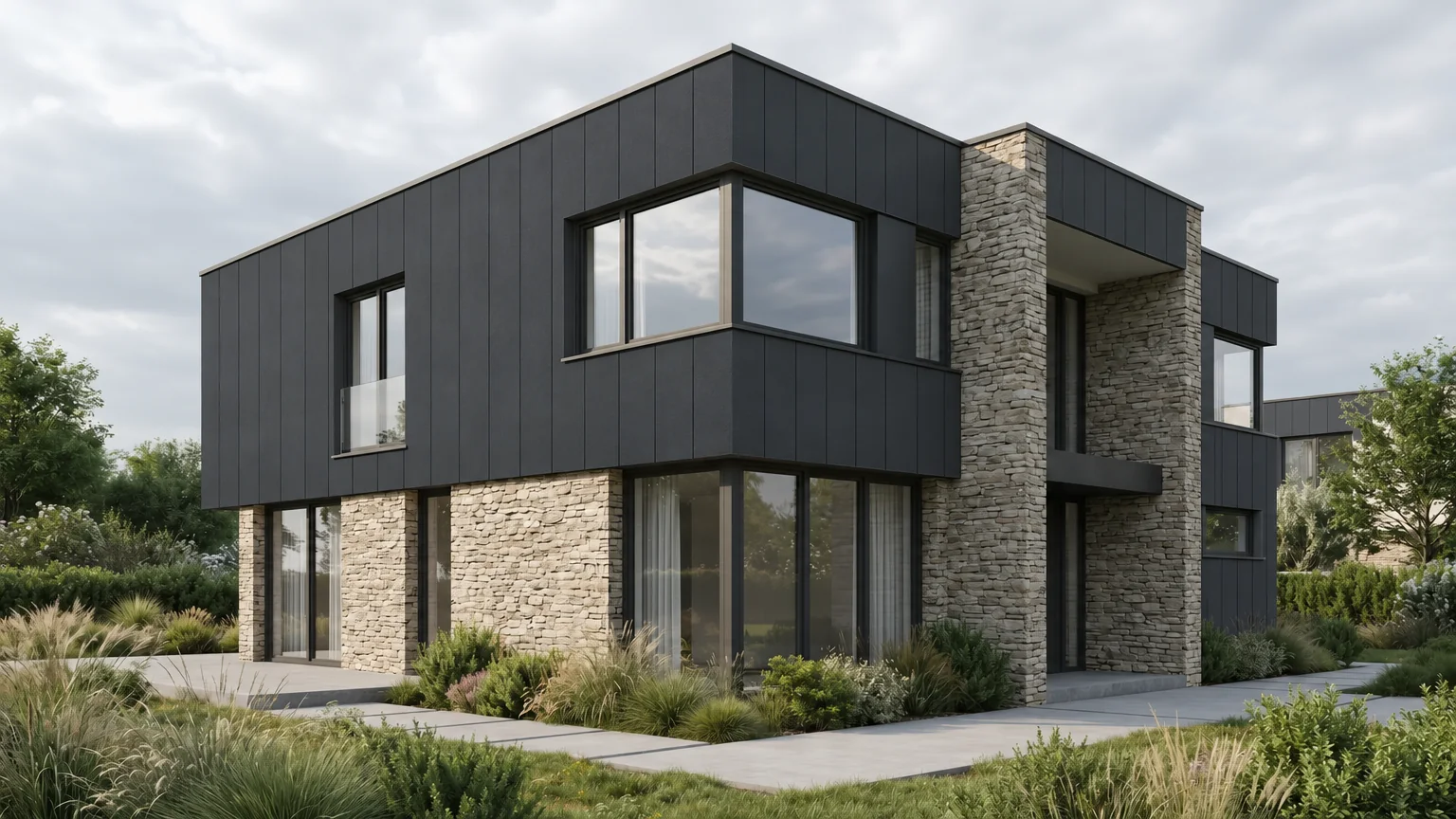
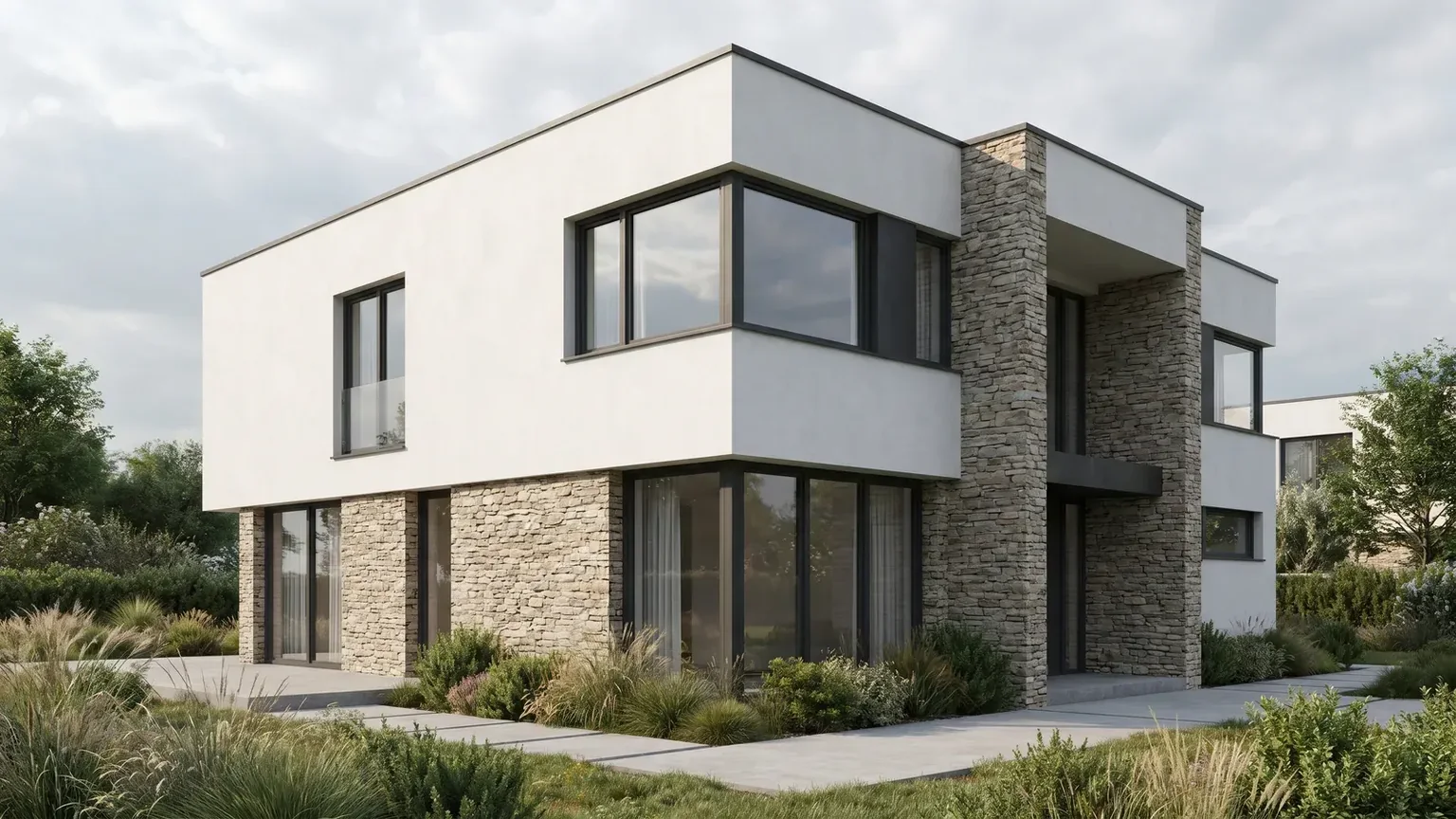
OpenAI positions Sunburst (Quality in Syntina) for work where editing precision matters most. We tried it: on the house above we asked, in Turkish, for only the plastered facade to become dark anthracite fibre cement panels with vertical joints.
The stone walls, windows, frames, landscape and framing stayed in place; the new panels also wrapped the roof edges. Quality took 49 seconds at high quality and 1536 × 864.
You can give several reference images. The mask and the markup layer apply to the first one.
A quality ladder
There are six options from low to max. Pick a lower one for a quick composition check and a higher one for the image you hand over.
Sizes up to 4K
The longest edge can reach 3840 pixels and the total can reach 8.29 million pixels. OpenAI marks anything above 2560x1440 as experimental.
The recommended sizes are 1024x1024, 1536x1024 and 1024x1536.
Transparent background
You can ask for a transparent background in PNG or WebP output. Useful for people, plants and furniture that you place into a scene afterwards.
How we use it in Syntina
One GPT line, two modes, honest defaults.
OpenAI's API has many settings and model names. We picked the ones that matter in an architect's day and simplified the choice for you.
We connect straight to OpenAI's API
Every 2.6 engine runs on OpenAI's own API. We price each generation from the actual usage OpenAI reports and build our credit table from our own measurements.
One GPT line: 2.6 Fast and 2.6 Quality
Since 7 November 2026 these are the only two in the pickers. Older versions left the pickers, and work you saved with them moved to the successor automatically, with its settings. Fast maps to Flare, Quality to Sunburst.
Default quality: high
With 2.5, almost every generation was made at high quality or above, so we made high the default. Going lower or higher is one click.
Auto 2K and Auto 4K
Both size options keep the aspect ratio of your source image. Ask for 2K on a wide elevation and it stays wide; it is not cropped to a square.
The same model everywhere
Generation and editing on the canvas, image editing in the SketchUp and 3ds Max plugins, and one "GPT Image 2.6" card in the iOS app where you choose fast or quality mode.
We handled the retirement early
OpenAI shuts 1.5 down on 1 December 2026. We moved our 1.5 engines to 2.5 on 7 November 2026, weeks ahead, and the pickers then moved to 2.6. An older canvas or setting does not break because of it.
For architects
Where it helps in the office
Try with Fast, finish with Quality
Test composition, light and materials quickly with Fast. Take the direction you like to final output with Quality.
Revision rounds on one scene
After client comments, edit the same scene instead of regenerating it: change the floor material, the furniture or the daylight and leave the rest in place.
Transparent cut-outs for entourage
Generate people, trees or furniture with a transparent background and drop them into a board or collage. Transparent background works in editing too.
Large output for boards
Auto 2K and 4K give large output while keeping the source ratio. Above 2560x1440 is experimental according to OpenAI, so check the result closely before it goes to print.
Limits
What it does not do, and what to watch
A mask is guidance, not an exact cut
OpenAI's own documentation says the model may not follow the mask's shape with complete precision. Check the result where edges have to hold to the pixel.
Quality is slower
In our own measurements a 1024x1024 high-quality generation took about 8 seconds on Fast and about 45 seconds on Quality. A 2K edit on Quality took about 39 seconds at high and about 88 seconds at max.
4K is experimental
OpenAI marks anything above 2560x1440 as experimental. Syntina offers 4K, but try it once before an important delivery.
Low quality is not much cheaper
In our measurements, 2.6 low and medium use more tokens than 2.5 did, so low is not clearly cheaper than high. Lowering the quality to save credits does not buy you much.
FAQ
Frequently asked questions
- Do I need an OpenAI account to use GPT Image in Syntina?
- No. The model runs inside Syntina and generations use your Syntina credits.
- Should I pick Fast or Quality?
- Fast while you are looking for ideas; Quality when editing precision matters or you are producing the final output. OpenAI also points to Flare for fast iteration and Sunburst for detailed work.
- How many credits do Fast and Quality cost?
- Credits depend on quality and size and are shown before you press Generate. Fast and Quality bill the same; the difference is speed and detail. A generation costs at least 4 credits and an edit at least 8.
- What happened to the older GPT Image versions?
- Since 7 November 2026 the pickers show only 2.6 Fast and Quality. Work you saved with older versions moved to the successor with its settings.
- Can I get a transparent background?
- Yes, in both generation and editing. According to OpenAI, transparency works with PNG and WebP output.
- Can I get 4K output?
- Yes. Auto 4K keeps the source ratio and goes up to about 8.3 megapixels. OpenAI marks anything above 2560x1440 as experimental, so check the result on important work.
Sources
Where the company facts on this page come from
- OpenAI: Introducing Images 2.62026-11-04
- OpenAI API: Image generation guide
- OpenAI API: gpt-image-2.6-sunburst
- OpenAI API: gpt-image-2.6-flare
- OpenAI API: Deprecations
Sources checked on 14 November 2026.
OpenAI and its product names are trademarks of their owners. Syntina uses these models through OpenAI's public API; this page was not prepared by OpenAI and does not imply endorsement or a formal partnership. The company's own measurements and benchmarks are reported as its claims.