
ChatGPT and Gemini edit one image well. An architecture project needs more.
General chat apps are now very good at a single image. An architecture project needs dozens of variations of the same frame, revisions that stay true to the source, views straight from your CAD model and delivery formats like video. Here is the difference, without exaggeration, shown with an experiment on the same frame.
 Source frame
 Chain 1: golden hour
 Chain 2: night
Every variation from the source
On the canvas every preset reads the source image itself, so the second and third variation run on the untouched original, not on top of the previous result.
Variations side by side
Day, night and material alternatives of the same frame sit next to each other on the canvas; select two and compare them with a before/after slider.
Architectural edits ready to go
Day to night, adding people and trees, or changing a material run in one click, from presets with the instruction to keep the rest of the scene already written in.
Which One When
A general assistant is enough for one image. A project needs a workflow.
ChatGPT and Gemini are general-purpose assistants: they write, summarise files and edit an image you upload quite well. For a quick idea image, a moodboard draft or "what would this wall look like in white", they are enough, and most offices already have them open. We won't pretend otherwise; keep using them for one-off work.
Architectural visualization isn't one frame, though; it's a series. The same camera angle by day and by night, three facade materials, two landscape options, then the client's revision, then a short video. A chat interface lines that series up as a message thread: each new request naturally runs on the latest image on screen, earlier variations scroll out of sight, and to get an image from your SketchUp model you take a screenshot and upload it.
Syntina spreads the same series across a canvas: the source frame stays put, every variation branches from it, architectural edits come as ready presets, SketchUp and 3ds Max send their views directly, and the chosen frame becomes a video, a 360° panorama or a 3D model. One honest note: Syntina's own Chat screen also edits the latest output by default, just like ChatGPT. The difference is that you have a canvas to step out of the chain and work from the source whenever you want.
Experiment
Same prompt, two starting points: the latest output or the source?
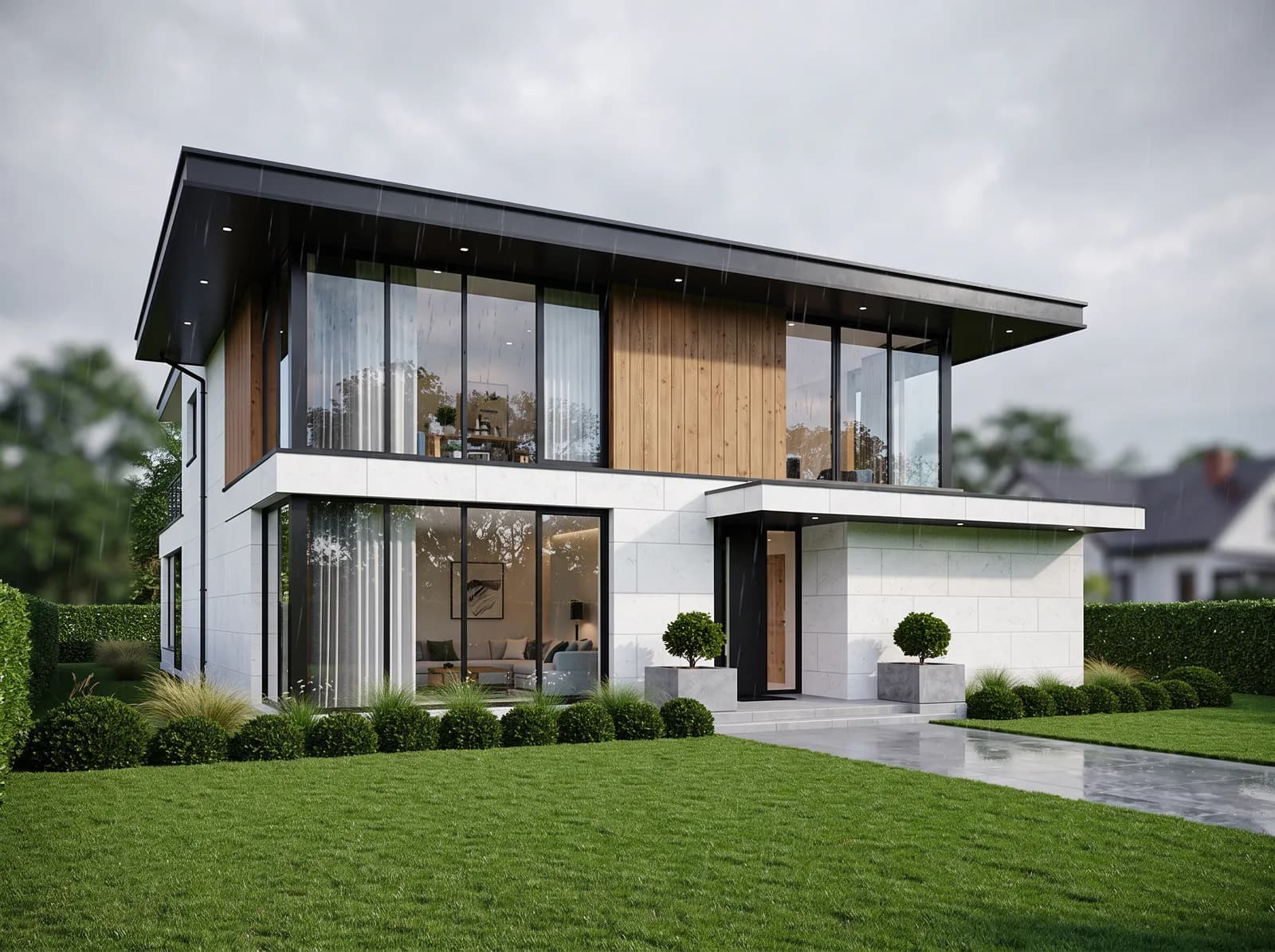
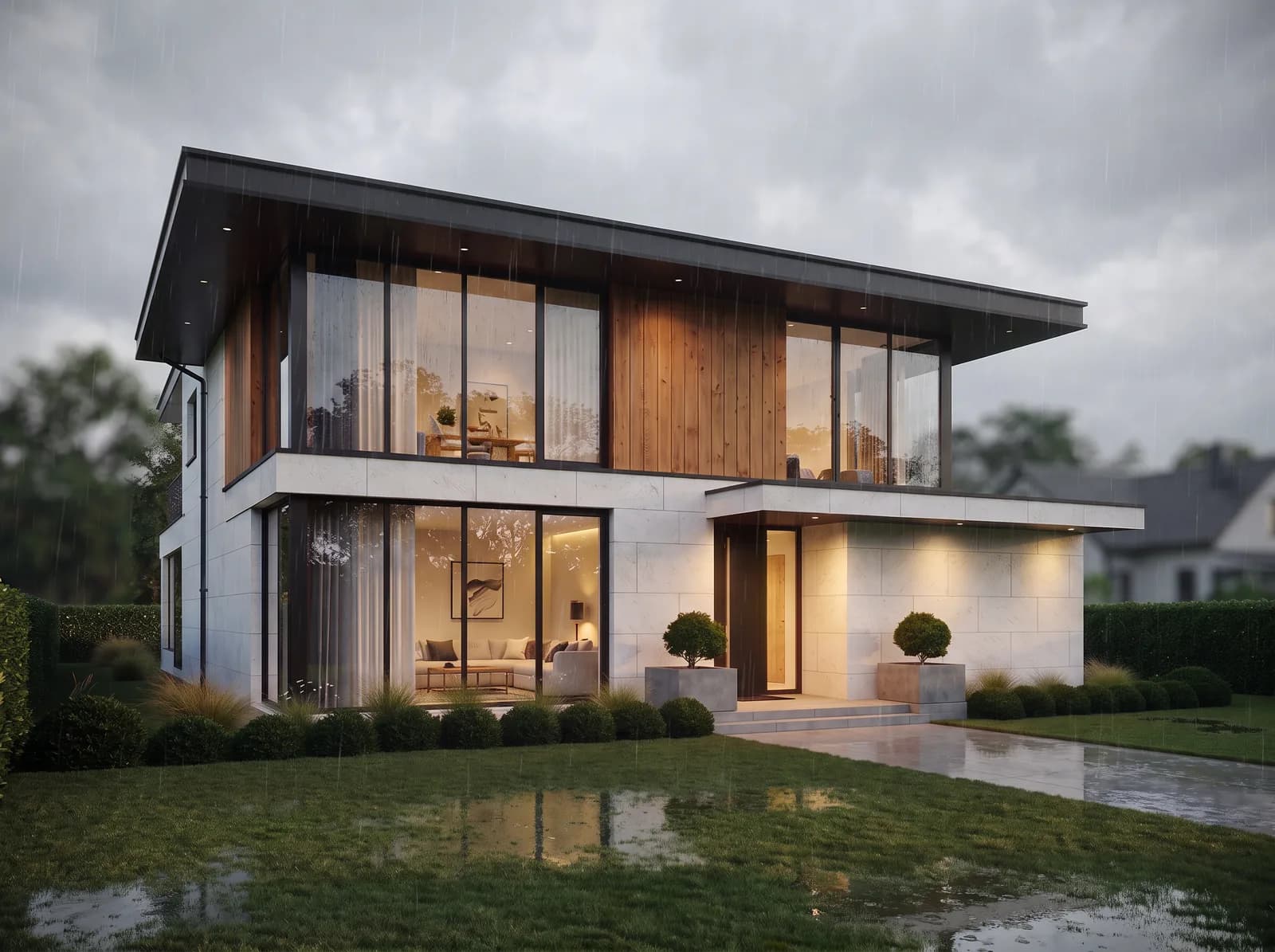
Same engine, same Rainy preset, one attempt each. On the left the prompt ran as the third edit, on top of the night frame, and the night's interior lights and the wall light on the right carried over into the rain. On the right the same prompt ran on the source. We ran this in our own pipeline; what it shows is chaining itself.
Chain 1: golden hourChain 2: nightChain 3: rain Chain 4: 'back to midday'
 From source: nightFrom source: rain
How It Works
From brief to output in three steps.
- 01
Put the source on the canvas
Upload a sketch, photo or plan; if you work in SketchUp, 3ds Max or Blender, send the view straight from the plugin. The source frame stays fixed on the canvas as its own node.
Input: Sketch, photo or 2D plan, SketchUp, 3ds Max or Blender view (via the plugin), A view exported from Revit, Archicad or any other program, Material or style reference
- 02
Branch with a preset or your own prompt
Every preset or prompt creates a new node connected to the source, with 1 to 4 images per run. Drop a branch you don't like and start a new one from the source.
- 03
Take the frame you choose to delivery
Upscale it, turn it into a video or a 360° panorama, or into a 3D model, all in the same account with the same credits.
Output: Lighting, season and material variations of the same frame, Scenes with people, trees or cars added, Image-to-video, 360° panoramas and 3D models (GLB)
In Depth
A general chat app and Syntina, in four questions
Does it keep the geometry?
No AI image engine guarantees geometry, ChatGPT, Gemini and Syntina included. The difference is who asks for it. In a chat you have to write "don't change the building, the camera or the composition" in every request yourself.
Most of Syntina's edit presets have that instruction written into the prompt: Day to Night, Add Trees, Change Material and Final Render explicitly ask to keep the architecture, the composition and the camera angle. The source image's aspect ratio is kept automatically too. Not every preset works this way: View to Render and Add Realism deliberately enrich the image and may add surroundings and objects, so compare the result with your model.
A copy of a copy: chained edits
In a chat, each new request usually runs on the latest output. We tested this in our own pipeline: on the same villa frame, with the same engine, we applied golden hour, then night, then rain, then asked to "go back to midday". The building geometry stayed largely in place through all four steps; current edit engines are good at that now.
But the state piled up: the night frame kept a pink trace of the sunset on the horizon, the rain frame inherited the night's interior lights and wall light, and the "back to midday" frame never got its blue sky with clouds or its hard shadows back, while the timber and grass turned darker. When we applied the same night and rain prompts directly to the source, none of those traces were there. OpenAI says ChatGPT Images 2.5 builds on earlier edits without degrading image quality over time; that may reduce quality loss, but it doesn't change the chain itself: each request still builds on the previous one. Sometimes that's what you want; when you need separate variations, it's the problem.
Comparing variations side by side
In a chat, three variations sit one under another in the thread; to let a client choose, you download them and line them up yourself.
On the Syntina canvas, frames from the same source sit side by side, connected to the same node. Select two and press Compare to open a before/after slider; you can export that comparison as a PNG, or as an MP4 on the Pro plan.
Architectural tools, plugins and delivery
Ready presets: day to night, golden hour, rain, winter, autumn, fog; adding people, cars, trees and grass; changing materials and products; changing the view through the windows; a top-down view from a plan. In the Layers screen you edit a brushed region or remove an object together with its shadow.
The SketchUp, 3ds Max and Blender plugins send the view without leaving the program; for Revit and Archicad you export the view and upload it. The chosen frame becomes a video through presets such as camera pan, drone shot and time lapse, a 360° panorama and shareable virtual tour, or a 3D model (GLB).
Prompt Patterns
Copy, paste, try it.
The protection clause (works in any tool)
You want to change a render's lighting without the building, the landscape or the camera drifting. Use it in ChatGPT, Gemini or Syntina's free-prompt node.
Turn this scene into early evening. Keep the building, facade materials, window divisions, landscaping, camera position and composition exactly the same; only the light and the sky change. Don't add any new objects.
The model makes every decision you leave open. Syntina's Day to Night preset adds this protection instruction for you.
Going back to the original in a chat
You've made a few edits in a chat and want the next variation generated from the first image you uploaded, not from the latest output.
Don't use the image you generated last; use the first image I uploaded in this conversation. Apply only this change: a rainy, overcast day. Lights off, building and camera unchanged.
The most reliable way to avoid chaining is to upload the original again. On the Syntina canvas every preset already reads the source.
Changing a single material
You want to change one facade material and keep everything else as it is.
Replace only the vertical timber cladding on the upper floor with light grey natural stone. Keep the white stone facade, window frames, light, shadows, landscaping and camera angle the same.
Name the surface that changes and list the ones that don't. In Syntina, the Change Material preset also takes a material reference image.
Comparison
ChatGPT, Gemini and Syntina side by side
The ChatGPT and Gemini columns are based on the vendors' own documentation, checked on 20 October 2026; the products change often, so confirm the current state on their pages. We don't list prices.
| Question | ChatGPT | Gemini | Syntina |
|---|---|---|---|
| Does it keep the geometry? | No guarantee; you write the protection into every request | No guarantee; you write the protection into every request | No guarantee; most edit presets add the protection instruction themselves, and the aspect ratio is kept automatically |
| Branching from the source | New requests usually run on the latest image; for the original you re-upload it or ask for it explicitly | New requests usually run on the latest image; for the original you re-upload it or ask for it explicitly | On the canvas every preset reads the source, which stays unchanged (the Chat screen edits the latest output) |
| Comparing variations side by side | In the thread and the Images gallery; no side-by-side comparison documented | In the thread and the Library; no side-by-side comparison documented | Side by side on the canvas; 1-4 images per run; before/after slider for any two frames |
| Architectural edit tools | Free-text prompt; a selection tool to edit one region | Local edits by free-text prompt | Ready presets for day to night, season and weather, adding people/cars/trees/grass and changing materials; brushed region edits and object removal |
| CAD plugins | We found no plugin that sends a view from the model; you upload a screenshot | We found no plugin that sends a view from the model; you upload a screenshot | SketchUp, 3ds Max and Blender plugins; export and upload for Revit and Archicad |
| Mobile app | Yes (general assistant; iOS and Android) | Yes (general assistant; iOS and Android) | iPhone app: shoot with the camera, apply a preset; no Android app |
| Video | OpenAI discontinued its Sora video tool in 2026; ChatGPT documents no video generation | 10-second videos from a photo or text with a Google AI subscription | Image-to-video through presets such as camera pan, drone shot, time lapse and walking person; no text-to-video |
| 360° and virtual tours | No documented 360° workflow | No documented 360° workflow | 360° render preset, panorama viewer and shareable virtual tour |
| Image to 3D model | No documented workflow | No documented workflow | Image to 3D model (GLB) on the web |
Scenarios
Where it's used in the field.
- Architects who show clients lighting, season and material variations of the same camera angle side by side
- Teams who want renders from SketchUp or 3ds Max without taking and uploading screenshots
- Studios that turn one frame into a delivery package with video, a 360° panorama or a 3D model
- Projects where revisions in a chat app got tangled and the original frame was lost
Final Check
Which one is for you?
- You want a one-off idea image or a moodboard draft.
ChatGPT or Gemini is enough; if it's already open, there's no need for another tool.
- You'll show a client lighting, season and material variations of the same frame side by side.
On the canvas every variation stays connected to the source, and you compare any two with a slider.
- You don't want to lose the original frame across revision rounds.
The source node stays unchanged; every new round starts from it.
- You work in SketchUp or 3ds Max.
The plugin sends the view without leaving the program; no screenshots to take and upload.
- The delivery also needs a video, a 360° panorama or a 3D model.
The frame you choose moves to those formats in the same account.
- You need exact dimensions, physically accurate light or construction-document images.
Neither a general chat app nor Syntina replaces that; use a render engine for final technical delivery.
FAQ
Frequently asked questions
- Is ChatGPT good enough for architectural rendering?
- For a single concept image or a quick idea test, often yes. When you need many variations of the same frame, revision rounds that stay true to the source, views straight from your CAD model and delivery formats like video, a tool built around the architectural workflow saves time.
- Does Syntina use ChatGPT's or Gemini's model?
- Syntina lets you choose between several image engines, and OpenAI's and Google's image models are among them; the list is on the AI models page. So don't expect a big difference in engine quality for a single frame. The difference is in the workflow around the engine: a canvas that branches from the source, architectural presets, plugins and delivery formats.
- Why do my edits drift a little every time in a chat?
- Because each new request usually runs on the latest output, and the previous step's light, colours and small decisions carry into the next one. In our own test the building geometry held, but the night's lights moved into the rain frame and "go back to midday" didn't bring the original sky back. Uploading the original again, or using a canvas that branches from the source, avoids this.
- Can I render my SketchUp model with ChatGPT?
- Yes: export the view with File > Export > 2D Graphic as a PNG and upload it. Syntina's SketchUp plugin skips that step; it captures the view without leaving SketchUp and sends it to render.
- What's the difference between Syntina's Chat and ChatGPT?
- Both edit by conversation and, by default, edit the latest output. Syntina's Chat offers the architectural presets, image-to-video and brushed region edits on the same screen; when you want to step out of the chain, the canvas in the same account works from the source.
- Can I try it for free?
- Yes. The free credits you get at sign-up let you try the canvas and the presets; move to a plan when you need more.
See the difference on your own frame
Put a render or a SketchUp view on the canvas and generate night, rain and material variations side by side from the same source.
Start with the free credits you get at sign-up; no card needed.