
In AI architectural rendering, the single input that decides the quality of the result is the prompt: the text that describes the scene. This guide does two things. First it shows why a prompt is written the way it is, so you can adapt the pattern to your own projects. Then it gives you ten real prompts you can copy and use as they are. We don't argue the claims with adjectives; we show real outputs from the same model, generated once, unretouched.
Every example below can be pasted straight into the Syntina canvas or into Chat.
One principle: the model makes every decision you leave blank
An image model is not a designer. It is a decision executor. When you type "Modern living room", you did not choose the floor material, the light, the camera or the style. The model did. Run that weak prompt five times and you get five different rooms, and none of them is the room in your project.
The formula for a good prompt is short: write decisions, not intentions. The seven items below are the seven decisions an image model is most eager to make on your behalf in an architectural scene.
The 7-part prompt template, and what each part changes
- Project type (residential, office, restaurant, hotel…) pins the model's assumptions about scale and fit-out. A residential living room and a hotel lobby differ in ceiling height, furniture density and material grade.
- Space (living room, kitchen, lobby, facade, terrace…) decides what enters the frame. Leave it out and you get "a generic interior".
- Style (modern, minimal, Scandinavian, industrial, classic…) steers furniture forms, the colour palette and the amount of detail with a single word. Not naming a style hands the style to the model.
- Materials and colours (floor, walls, furniture; "light oak hardwood", "cream painted walls") are the first thing a client looks at, and the area where the model behaves most randomly. The more precisely you name a material ("large-format grey porcelain tile" rather than "stone floor"), the more control you keep.
- Light and atmosphere (soft midday light, golden hour, night with warm spots) largely decides whether an image reads as a cheap render or a magazine photograph. A prompt without a light sentence defaults to flat noon lighting.
- Camera (eye level, wide angle, bird's eye, one-point perspective) controls composition. If you know the angle you will present, write it. If you don't, "eye-level wide angle" is the safe default for interiors.
- Quality statement ("photorealistic, architectural magazine photography quality, highly detailed") locks the model to a photographic aesthetic. Without it, results can drift toward illustration.
Don't memorise the template. Compare the two real results below, produced by the same model from a weak and a strong prompt.
Proof: same model, two prompts
Weak prompt: "Modern living room" (three words):
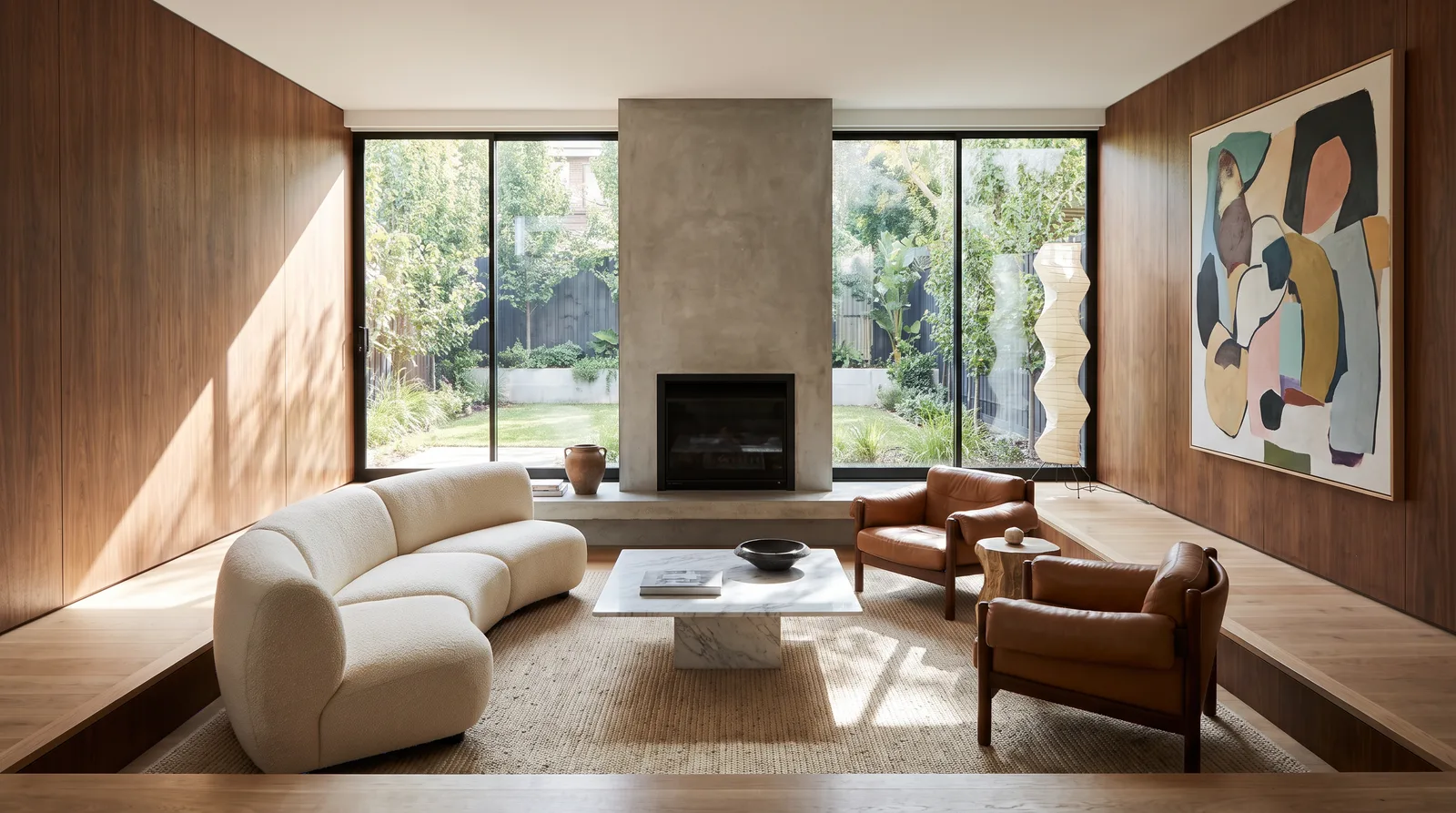
Notice that this is not a bad image. It is a very good image of somebody else's room. Walnut wall panelling, a concrete fireplace, a curved cream bouclé sofa, tan leather armchairs, a marble coffee table on a jute rug, an abstract canvas, a garden behind sliding glass. Every one of those is a decision, and you made none of them. Run the same three words again and you get a different set.
Strong prompt, Example 1 below, all seven parts:
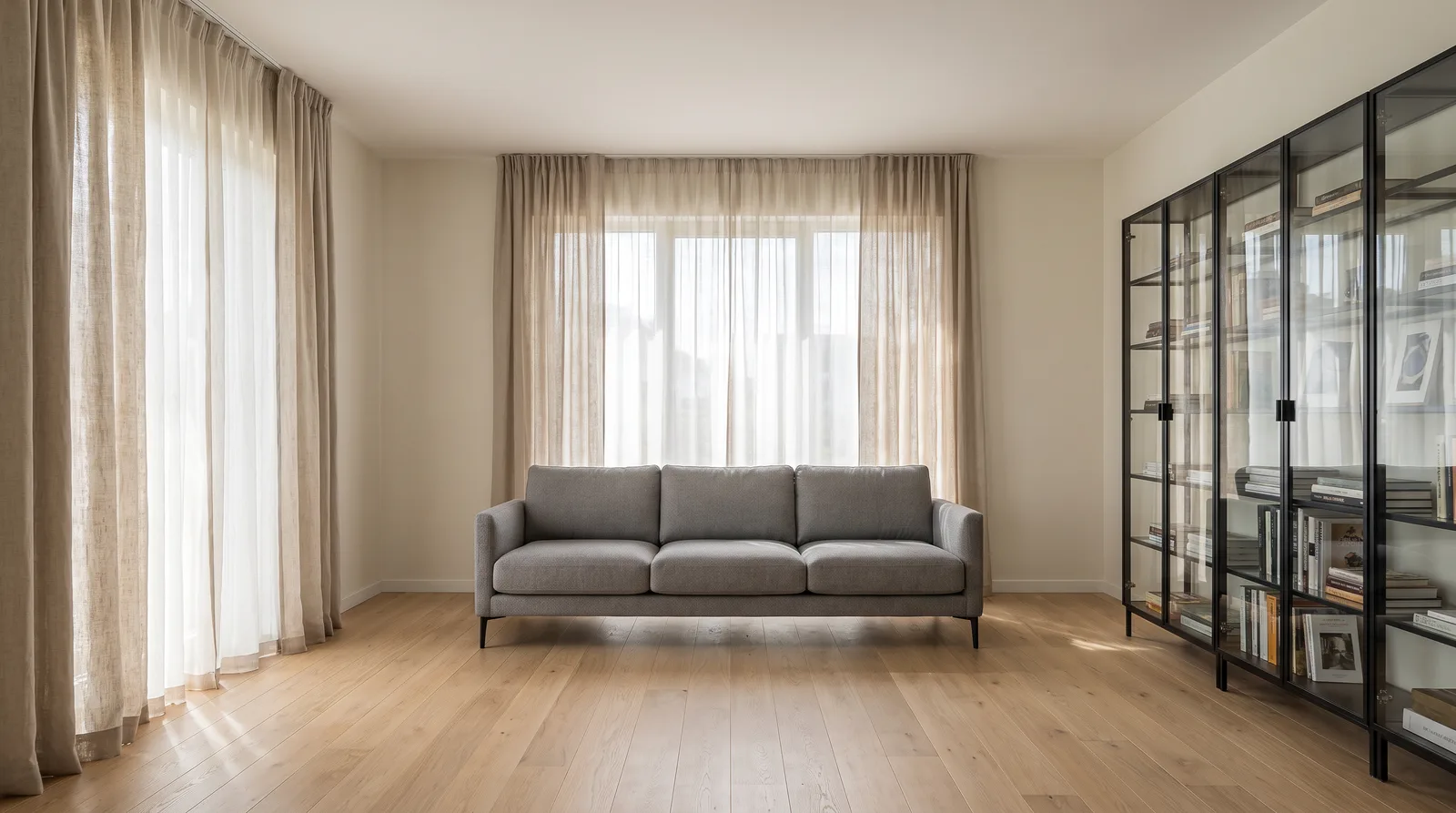
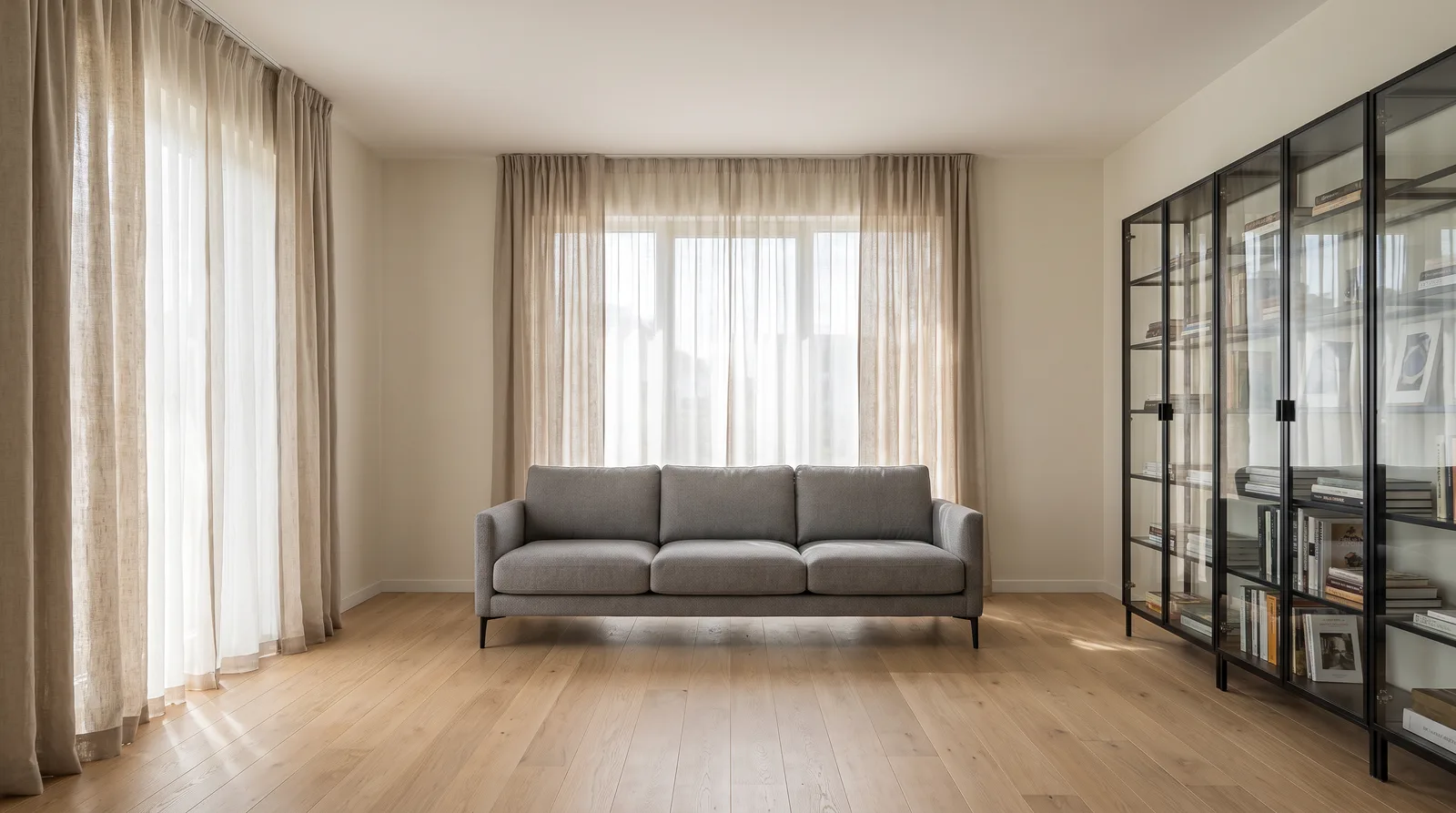
Both images come from the same engine, one attempt each. In the strong result, the light oak floor, cream walls, black-framed glass bookcase, grey three-seat fabric sofa, natural linen curtains and soft midday light are all there, and nothing else is. The model added no rug, no coffee table, no artwork, because we did not ask for them. That is the trade: the weak prompt gives you a richer picture, the strong prompt gives you your picture. If you want a coffee table, write one. The difference between the two images is not the model's ability. It is who made the decisions.
Generation prompts (from scratch)
1) Modern living room (interior)
A modern minimal residential living room. Light oak hardwood floor, cream painted walls, a glass-fronted bookcase with black metal frames. A three-seat grey fabric sofa, natural linen curtains. Soft midday light through large windows, gentle shadows. Eye-level wide-angle camera. Photorealistic, architectural magazine photography quality, highly detailed.
2) Scandinavian kitchen
A bright Scandinavian-style kitchen. Matte white cabinets, light wood countertop, white tile backsplash, black fixtures. Three pendant lights over the island, two wooden stools at the island. Morning light, airy and clean atmosphere. Eye-level camera, one-point perspective. Photorealistic, high resolution.
3) House exterior (golden hour)
The exterior of a two-storey modern detached house. A mix of white render and natural stone cladding, large glazed surfaces, flat roof. Landscaped front garden with a stone path and a few mature trees. Golden hour sunset light, warm orange tones, long soft shadows. Wide framing from a slightly low angle. Photorealistic architectural photography.
4) Restaurant interior (evening)
An industrial-chic restaurant interior. Exposed brick walls, a high ceiling with black steel beams, walnut tables and leather chairs. Backlit bottle shelves behind the bar. Dim, warm evening lighting with a candlelight feel on the tables. Wide angle showing the depth of the space. Photorealistic, atmospheric.
5) Bird's-eye site view for a sales office
A bird's-eye site view of a residential development. Four blocks around a landscaped inner courtyard with a swimming pool, a children's playground and walking paths. Clear daylight, vivid but natural colours. Drone photography aesthetic, sharp detail, sales presentation quality.
Pick the right operation first: generate, edit or refine?
There is a decision to make before the prompt: which operation fits the job in front of you? The wrong operation gives the wrong result even with the right prompt. The Syntina agent makes its own choice with exactly this table:
| What you have | Right operation | How the prompt is built |
|---|---|---|
| No image, you want the scene from scratch | Generate | Full scene description with the 7-part template (Examples 1 to 5) |
| An image, and you want to change one thing | Edit | Preservation clause + a single change (Examples 6, 7 and 9) |
| An image, and you want to improve or restyle the whole thing | Refine | "Keep the composition" + a description of the overall change (the logic of Example 8) |
| A product or material photo you want placed exactly as-is | Reference generation | See "Working with reference images" below |
The most common mistake is re-describing the scene while holding an image. Type "modern living room with a green sofa" and the model generates a new living room. It does not edit yours. To keep what you have, use the edit pattern.
Edit prompts (on an existing image)
The golden rule: say what changes, and state explicitly that everything else stays the same.
6) Material swap
Keep everything in the image exactly as it is: composition, camera angle, lighting, all other furniture and surfaces unchanged. ONLY change the floor from light oak hardwood to large-format grey porcelain tile.
7) Day to night
Turn the same scene into its night version. Composition and camera angle stay the same. Night sky, interior lights and warm white spotlights on, warm light spilling from the windows. Emphasise the facade lighting.
8) Sketch to photorealistic render
Turn this hand sketch into a photorealistic architectural render. Preserve the massing proportions, the openings and the perspective of the sketch exactly. Materials: board-formed concrete, timber slat facade detail, large glazed surfaces. Slightly overcast daylight. Highly detailed, architectural presentation quality.
9) Adding people to a scene
Keep the image as it is; composition, lighting and existing objects unchanged. Add 3 or 4 natural-looking people: one sitting on the sofa, two standing and talking. Scale and perspective must match the existing space.
Proof: two edit requests, two levels of control
We sent two edit requests to the same source image (the strong-prompt result above).
Short request: "Make the sofa green":
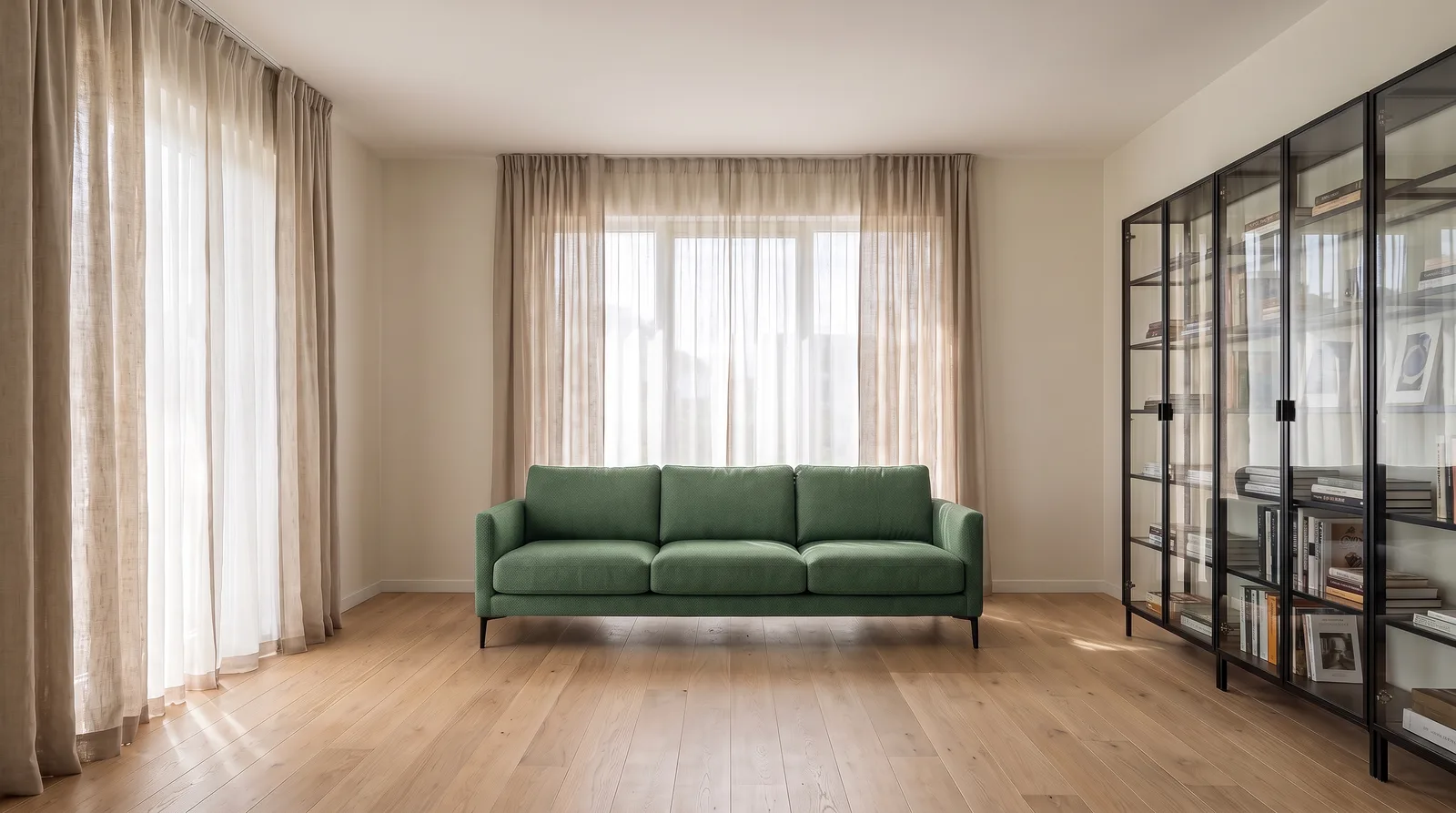
Preservation clause plus a precise decision: "Keep everything exactly as it is… ONLY change the three-seat grey fabric sofa to a dark green velvet sofa; keep its shape and position":
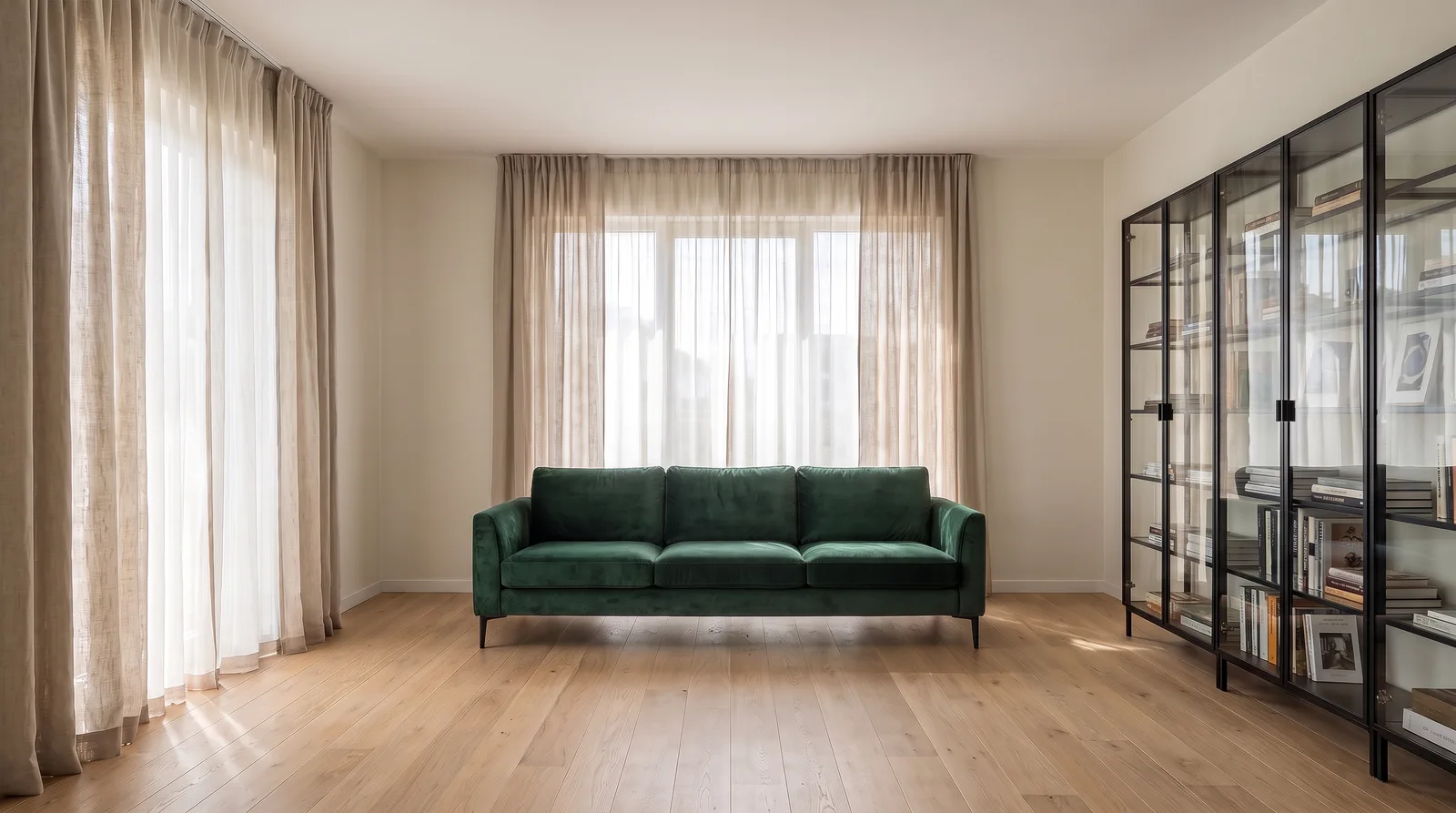
Two lessons here. First: a modern edit engine preserves the scene well even on a three-word request. In both results the floor, the curtains, the bookcase, the camera and the light are untouched. But which green? In the short request the model chose a muted sage green in the same fabric weave as the original sofa. In the protected prompt we got what we asked for: a dark green velvet with the sheen you'd expect from velvet, same shape, same position. Make the decision about the thing that changes too, not just its name. Second: the gap between "preserves most of it" and "identical to the millimetre" is exactly the gap a client notices in a presentation. The preservation clause turns that into a guarantee. Make it a habit.
Working with reference images: from moodboard to exact product placement
Separate two different needs; they are written differently.
a) Style transfer (moodboard): you want the feel of the reference, not its objects.
Design a modern hotel lobby using the colour palette, material language and atmosphere of the attached moodboard. Do not copy the objects in the moodboard; apply its style. Wide angle, photorealistic architectural presentation.
b) Exact product placement: you want that specific rug or sofa from your catalogue in the scene.
Place the rug from the second image into the living room in the first image. Use the rug EXACTLY as it is: pattern, colours, texture and proportions unchanged; do not generate a similar one. Everything else in the living room stays the same.
Two practical rules:
- Attach the image as a file (upload, drag and drop, or paste). Pasting a link inside the text does not work; for security reasons the system does not fetch external links.
- If you attached more than one image, name them in the prompt ("first image", "second image"). Don't leave the model to guess which is the scene and which is the product.
A real workflow: closing a client revision in five prompts
Don't look for a single miracle prompt. The professional flow is a chain, where each step works on the previous step's output:
- Generate: the prompt from Example 1 → the living room concept.
- Revision 1: "Keep everything the same, ONLY change the sofa to dark green velvet." → the client asked for a colour.
- Revision 2: "Same scene, camera and furniture fixed; change the light to golden hour, warm orange light coming through the window."
- Bring it to life: "Add 2 natural-looking people; scale and perspective consistent with the space."
- Turn it into video: the prompt from Example 10 → the closing shot of the presentation.
Ask for one change per step. When "make the sofa green, make it evening, and add people" is crammed into one prompt, the model picks its own priorities and usually does all three halfway.
The video prompt
For video, describe motion, not the scene. The scene is already in the image:
10) Short promotional video from an image
Generate a short cinematic video from this image. The camera moves forward very slowly (dolly-in), with slight natural movement in the curtains and foliage. Light and colours stay constant, no sudden transitions. Smooth, real-estate promotional film aesthetic.
Three safe camera patterns: dolly-in (slow approach, for interior presentations), orbit (a slow circle around the building, for exteriors), pan (a horizontal sweep from a fixed point, for panoramic spaces). In Syntina Chat you don't have to pick duration and resolution yourself: the agent suggests a model that fits the request, shows the credit cost before generating, and does not start without your approval.
Weak prompt → strong prompt
| Weak | Strong |
|---|---|
| "Modern living room" | As in Example 1: style + materials + light + camera + quality |
| "Make the facade nicer" | "Keep the facade composition; render the plaster white, clad the ground floor in natural stone, make the window frames anthracite" |
| "Make it more realistic" | "Keep the same scene; sharpen the textures, change the light to natural daylight, raise it to photorealistic architectural photography quality" |
| "Put the rug in" (two images attached) | "Place the rug from the second image into the living room in the first image; use the rug exactly as it is, don't generate a similar one; everything else stays the same" |
The common thread: a weak prompt states an intention, a strong prompt states a decision. The less room you leave for the model's interpretation, the more the result is yours.
The 7 most common mistakes
- The three-word request. "Modern living room": the model fills every blank itself. See the proof image above.
- Re-describing the image you already have. "Modern living room with a green sofa" is not an edit, it is a new generation, and your composition is gone. Use the edit pattern.
- Editing without a preservation clause. "Make the sofa green" keeps most things, but not everything. For presentation work, the pattern in Examples 6 to 9 is mandatory.
- Cramming several requests into one prompt. Every revision is its own step; follow the chain above.
- Contradictory requests. "Minimal but richly decorated" leaves the model undecided.
- Describing with negatives. Instead of "not dark", write "bright, soft daylight". Models work better with positive descriptions.
- Pasting the reference as a link. If the image is not attached as a file, the model cannot see it, and "keep it exactly" requests cannot work without the reference attached.
Frequently asked questions
Is there a limit to prompt length? The limit is not length, it is indecision. A 60 to 80 word prompt that covers the seven parts is ideal; a 200-word prompt full of contradictions does worse than a clear 15-word one.
Why do I get a different image every time from the same prompt? Models are probabilistic; every decision you leave blank is made again on every run. As the prompt gets more precise, the variation between runs shrinks but never reaches zero. That is why you should move forward from a result you like with edits, not with fresh generations.
Should I write the prompt in English? The template works the same in any language; for the examples in this guide we wrote and tested in English. What matters is that every one of the seven decisions is present.
If you'd rather not write prompts: tell the agent
For anyone who doesn't want to learn these patterns, there is a shortcut. Tell Syntina Chat what you want in everyday language, "make the floor hardwood, keep the rest", and the agent builds the professional, preservation-clause prompt from this guide for you. It picks the right operation and model, and for credit-heavy jobs such as video it shows the cost and asks for your approval first.
Related pages
- Turn a Sketch Into a Realistic Render With AI
- 17 Ready-to-Use Architecture Prompt Examples
- AI Interior Visualization
- Syntina for Architects and Interior Designers
To try these prompts, create a free account, paste an example into the canvas and see the result.